When your studying gets scattered across too many apps
You sit down to practise one topic and start by searching. The reading is in a folder, your explanation is in a notes app and the questions are somewhere else. Before testing what you know, you have to work out which version is current. That detour is worth addressing.
The Aria editorial team · 7 min read · For students who use several tools for course materials, notes, practice and planning.
Using several study apps is not necessarily a problem. It becomes awkward when studying one topic requires searching, copying and updating several versions. Keep closely related work together, retain necessary specialist tools and try one subject before moving more. Fewer apps are a means to an end, not a learning goal.
Where does your workflow break down?
Think about your last study session. Did you search for a file you knew you had? Copy a passage into another tool just to create questions? Add the same task to both a calendar and a separate list? Some of these actions may be necessary, but they can also create a layer of administration around the actual subject.
Consider a topic on supply and demand. The lecture file contains one diagram, your notes explain another and a flashcard uses an older definition. When you notice the mismatch, it is not immediately clear what needs updating. The tools may each work well; the problem is that maintaining the relationship between them has become another job for you.
Start by identifying one point where you regularly get stuck. Write down what you were looking for, where it was stored and why you had to switch. That gives you a better basis for choosing tools than a long feature list. First establish which detour you want to remove.
What does research say about switching tasks?
In 2001, Rubinstein, Meyer and Evans studied how alternating between different task rules affected the time participants needed in controlled experiments. Tasks included classification and arithmetic. They found switching costs that varied with the task and the cues participants received. They were not measuring how many study apps a student should use.
Leroy’s 2009 study examined transitions between work tasks. Under the conditions studied, thoughts about an unfinished task could persist and impair performance on the next task. This may be relevant when you interrupt an explanation to organise files or check something unrelated, but it does not mean that every change of app has the same effect.
Opening a PDF while writing about it can be part of one continuous task. Moving from a reading to messages and back can involve a genuine task change, even within one app. The research therefore supports thinking carefully about unnecessary interruptions, not promising better grades simply because everything is in one program.
Keep related work together
A useful workspace offers a clear route from a source to your own work. For one topic, that might mean the relevant reading, the note in which you explain it and the questions you use for self-testing. You do not need the entire semester on one screen. What matters is finding the right material again without creating another copy every time.
- Source: Decide where the original lives and use clear file and topic names.
- Your thinking: Keep explanations and unanswered questions close to the material they concern.
- Practice: Make it straightforward to move from a question to an independent attempt.
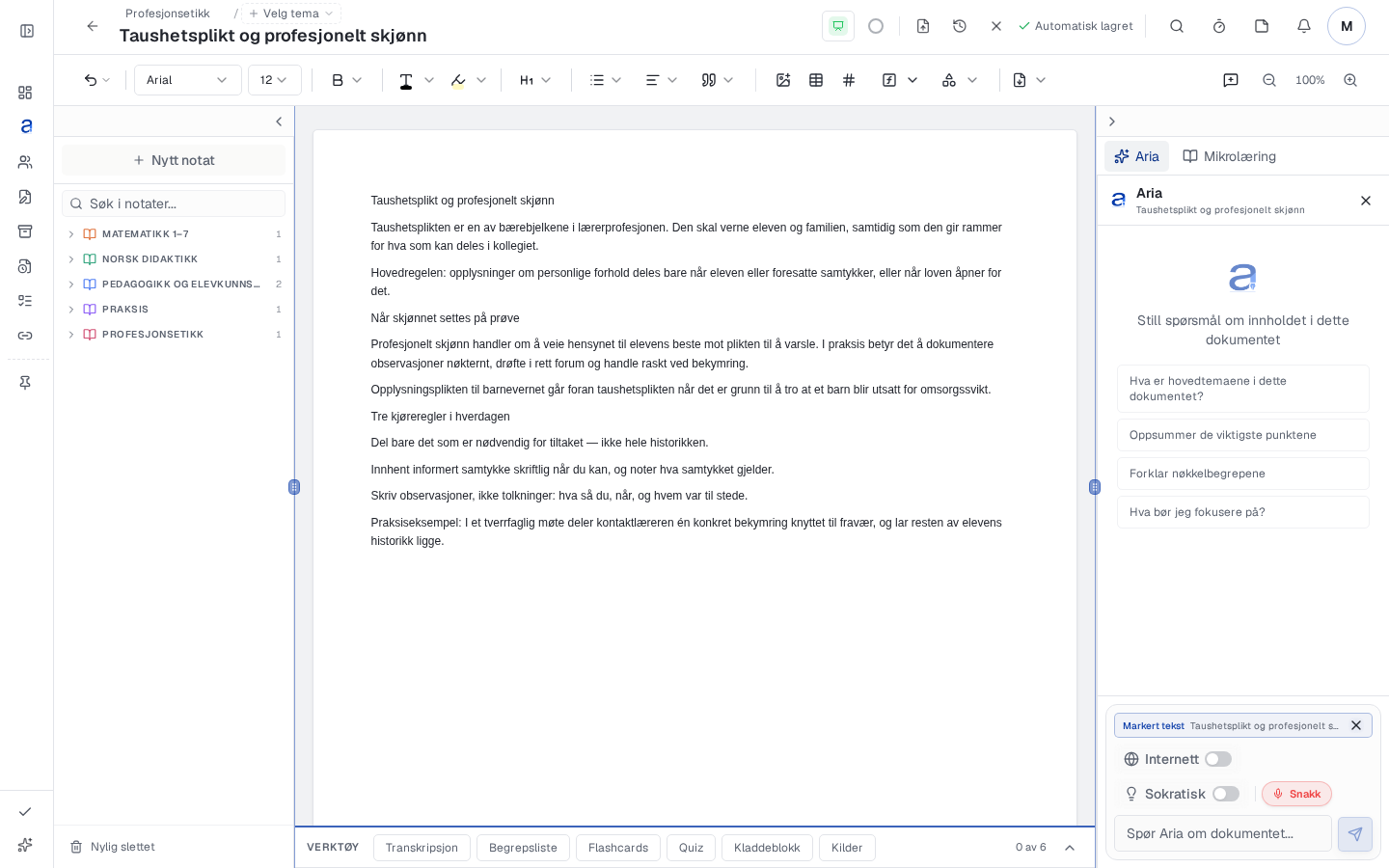
In Aria, subjects and themes can organise notes and associated material. The note workspace also provides access to learning tools. This does not mean that every external document is linked automatically, or that editing a note updates every question. Check what is actually associated with the subject and select a relevant source when starting practice.
Try one subject in four steps
Choose a topic you need to work on this week, such as the difference between movement along a demand curve and a shift of the curve. A small trial lets you assess the workflow before moving important material or changing all your habits.
- Open a subject and a relevant note in Aria. Check the subject and theme associations, then select or add the source you need. Wait for any text extraction to finish.
- Write a short explanation of your own and one question to investigate. Keep a clear connection to the original source rather than making several unlabelled copies.
- Create your own flashcards or use a quiz based on relevant available content. Check questions and answers against the course material before testing yourself.
- Answer without help and record what remains unclear. Choose a specific next attempt and reserve time for it in your calendar if useful.
For this example, explain that a change in the good’s own price produces movement along the curve, while another influence, such as a change in income, can shift it. Check what your course says about normal and inferior goods too. You are investigating a meaningful distinction, not merely whether you can find the right app.
Fewer detours, not just fewer icons
Scattered work
- Search for the most recent copy.
- Paste the same extract into several places without a clear source.
- Tidy the setup but postpone self-testing.
A clearer route
- Find the source and note under a familiar subject and theme.
- Use selected content as the basis for questions.
- Test your knowledge, correct errors and choose the next task.
This is an organisational example, not a measured outcome. You can create a clear route using several apps too. Assess your trial week by whether you can find materials, avoid unnecessary copying and actually complete practice. A simple setup has little value if it makes essential subject tools harder to use.
Dunlosky and colleagues’ 2013 review supports practice testing and practice distributed over time. Active recall here means trying to retrieve an answer before looking at it. An integrated study app can place that activity near your notes, but the learning work happens when you answer, check and try again.
What should stay outside your study app?
Your institution’s submission system, a required analysis program or a reference management tool may still have an important role. Nor do you need to move a calendar that already works well. Coordination is about reducing redundant work, not making one app responsible for everything you need throughout your course.
Before a larger move, test with copies and check text, images, equations and tables. Investigate the export options you need, which features your subscription includes and whether the material is suitable for uploading. Follow your institution’s rules on personal data and sharing; keep sensitive documents out of the trial.
End the trial week with one question: was it easier to return to the subject itself? If so, expand gradually. If you have acquired another archive to maintain instead, retain what works and adjust the specific connection that still creates extra work.
Do this now
- Identify one recurring detour in your studying.
- Choose a clear original source and a focused topic.
- Try the route from notes to self-testing with one subject.
- Keep necessary specialist tools and check copies before a larger move.
Frequently asked questions
How many study apps are too many?
There is no established ideal number. Look for unnecessary searching, copying and maintaining multiple versions rather than counting apps.
Is one study app always better than several?
No. An integrated setup is useful when it simplifies your workflow. Several tools can work well if you know where materials live and how to use them next.
Does editing a note update every practice question?
Do not assume so. Check questions against the updated source and revise or replace them when the content changes.
Must I move my entire archive to try Aria?
No. Start with one subject and a small selection of material. Keep the originals and assess the workflow before moving more.
Sources
Try a shorter route from notes to practice
Start with one topic and the materials you already use. Try Aria free for 7 days.
Start 7 days free